.png)
From Wireframes to Copy: How Designers can Ship Faster
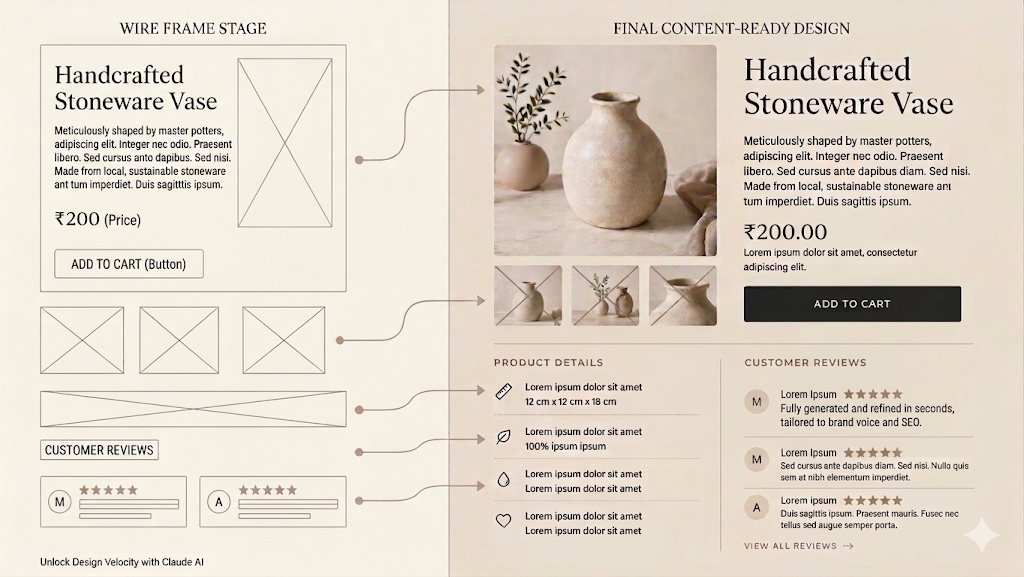
Why Designers Lose Time to Copy, Not Design
Most designers do not lose their week to design. They lose it to copy revisions.
A wireframe takes an afternoon. The headline above the hero took four days, three Slack threads, and two stakeholder reviews. The error messages ship as whatever the engineer typed because no one had time to revisit them.
Working designers spend a substantial portion of their week on text-related tasks, writing, refining, and rewriting copy across the surface area of a product. For most teams, that text layer is the slowest, most negotiated part of the design process.
In this blog we’ll explore how Claude can become a practical accelerator for the designers. Not as a tool that draws screens, but as one that handles the dense layer of language sitting on top of every screen. With a deliberate workflow, design teams can move from wireframe to shippable, on-brand product in days rather than weeks.
The Wireframe-to-Copy Bottleneck in Design Workflows
The friction between wireframes and finished copy is structural. It shows up in three places.
- Iteration drag. A wireframe is a hypothesis about layout. Real copy usually breaks it. Headlines run too long, CTAs feel flat, and body text fights the visual rhythm. The retrofit cycle repeats two or three times before anything ships.
- On-brand alignment. Most companies have brand guidelines. Few have machinery for applying them at the speed of design. New features ship with copy that is technically correct but tonally generic.
- Visual-text mismatch. Words and layout are designed in different tools, by different people, on different timelines. Each review surfaces a new misalignment.
The before/after is straightforward. Manual: The wireframe is approved Monday, the copy is briefed Tuesday, the draft lands Thursday, and approval comes the following Tuesday eight working days.
With Claude integrated, the wireframe is approved Monday, the draft is generated within the hour, alignment happens Tuesday, and the copy is dev-ready Wednesday two working days.
Key Claude AI Features for Designers
Three Claude capabilities matter most for design workflows.
- Image prompting. Claude reads uploaded wireframes, mockups, and screenshots, so you upload the wireframe and ask for a copy that fits rather than describing it in text.
- Artifacts. When Claude generates content meant to be reused in copy decks and component documentation, it produces them as structured artifacts that can be revised in place.
- Projects. A persistent workspace that holds shared context: brand guidelines, voice and tone documents, prior copy, and design principles. Every conversation inside the project inherits this context automatically. This is what turns Claude from a generic copywriter into one that sounds like your brand.
For teams ready to integrate further, Claude connects to design and automation stacks through Zapier, Make, and direct API access enough to embed it into Figma plugins, Webflow CMS pipelines, or internal tooling.
Best Practices for Using Claude AI in Design Workflows
- Build a project per brand, not per task. The setup cost pays back within two uses.
- Use image analysis early. Uploading the wireframe at the start prevents copy retrofitting at the end.
- Pair Claude with existing tools; do not replace them. Figma for design, Webflow for production, and Claude as the connective text layer across both.
- Keep humans on tone and on point. Claude is excellent at competent, on-brand drafts. It is not where you make brand decisions or sign off on legally sensitive copy.
- Set access boundaries deliberately. When integrating via Zapier or APIs, treat Claude like any other system handling brand and customer data scoped credentials, audit logs, and clear data boundaries.
- Avoid the over-reliance trap. Speed is only useful when paired with judgment. Stop reading, and quality drops the same week.
How We Cut Our Design Cycle From Weeks to Days With Claude AI
At Tweeny Technologies, we have rebuilt our design workflow around Claude AI, and the productivity gains have reshaped how we ship. What used to take our design team eight to thirteen working days, from wireframe approval to dev-ready content, now consistently takes two to three. Claude handles the dense layer of language sitting on top of every screen: headlines, microcopy, empty states, error messages, and handoff documentation while our designers focus on the work that actually requires their judgment: layout, hierarchy, brand expression, and user experience.
By treating Claude as a working collaborator rather than a one-shot tool and by configuring projects with our brand voice, prior copy, and design principles, we have compressed our release cycles, eliminated round-trip handoffs between design and content, and freed our team to spend more time on craft and less on revisions.
Conclusion: How to Start Using Claude AI for Design This Week
The wireframe-to-content bottleneck has defined design timelines for as long as products have had words on them. Claude compresses it from weeks to days, and for teams willing to redesign their workflow rather than bolt AI onto the side, the compression compounds across every release.
The next generation of design tooling is moving toward embedded, context-aware AI inside Figma, Webflow, and your design system. The teams building that infrastructure today, projects, brand context, and documented workflows are the ones moving fastest a year from now.
Pick one screen this week. Upload the wireframe to Claude. Run the five-step workflow end-to-end. Ship faster, design smarter.


Explore more blogs




Building intelligent products, modern web platforms, and custom digital experiences.